
Guide
How to sync your SIS with Microsoft Teams automatically (2026 guide)
A step-by-step guide for college IT teams: automate class team creation, enrollment sync and end-of-term archiving from your SIS to Microsoft Teams.





Microsoft Teams for Education is the classroom-ready version of Teams, part of the Microsoft 365 Education suite. This guide covers what it ships with, how it differs between K-12 schools and higher education, and whether Teams can serve as your LMS. Teameo adds what higher education needs on top: SIS integration, automated class provisioning, meta-course fusion, and Class Notebook lifecycle management.
Teams for Education is the version of Microsoft Teams built for educational institutions. On top of chat, meetings and files, it adds Class teams with distinct student and teacher roles, a built-in Class Notebook, Assignments and Grades apps, and education-specific privacy controls. It is the de facto learning platform for the thousands of colleges and universities that have standardized on the Microsoft 365 ecosystem.
Teams for Education belongs to Microsoft 365 Education (formerly Office 365 Education), Microsoft's bundle of cloud productivity tools licensed for educational institutions. It comes in three main tiers: A1 (free for qualified institutions, web-only apps), A3 (full desktop apps, advanced management), and A5 (adds advanced security, analytics, and compliance).
Teams is the learning surface; the rest of Microsoft 365 Education supplies mail, storage and identity around it. The parts that matter for higher education:
Teams for Education is a single product, but the operational reality differs between K-12 schools and colleges, CEGEPs, and universities. Microsoft's own tooling, School Data Sync (SDS) and Education Insights, is primarily designed with K-12 in mind.
| Dimension | K-12 | Higher education |
|---|---|---|
| SIS and Microsoft sync | SDS covers most needs | Major SIS and ERP platforms, plus custom in-house systems; SDS is limited |
| Class volume per term | Hundreds | Thousands |
| Multi-section courses | Rare | Common; needs meta-course fusion |
| Term structure | Full academic year | Semester or trimester, with add/drop periods |
| Compliance regime | FERPA, COPPA, local | FERPA, Law 25 (Quebec), GDPR (EU), provincial privacy acts |
| Pedagogical staff | Teacher = single role | Instructors, TAs, techno-pédagogues, auditors, cross-listed teaching |
Why Teameo is built for higher education. Teameo was built by an LS2 Innovation team with direct experience in Quebec CEGEPs and universities. Every design decision reflects that reality: SIS integrations for the major higher-ed platforms and for custom, in-house systems; meta-course fusion as a first-class concept; audit logs designed for Law 25 and GDPR; term-aware archive automation; and an admin interface built for techno-pédagogues, not classroom teachers. See how Teameo compares to Microsoft SDS.
For institutions standardized on Microsoft 365, largely yes. Teams for Education provides most of the features traditionally found in a learning management system, and using it as the LMS removes the cost and complexity of running a separate platform. Many colleges and universities do exactly this. Out of the box, though, Teams is not a complete LMS at higher-ed scale.
The biggest LMS-specific gap is the role model: Teams has "owner" and "member", while higher education has instructors, co-teachers, TAs, auditors, and cross-listed faculty. The other gaps (SIS provisioning, multi-section courses, Class Notebook lifecycle, compliance-grade audit trails) affect Teams for Education as a whole and are covered in the next section.
Teameo runs on top of Microsoft Teams for Education and closes the gaps that matter for class management:
Teams for Education is built with K-12 as the dominant persona, and Microsoft 365 Education covers productivity, collaboration, and identity, not the operational connection between your student information system (SIS/ERP) and those surfaces. At higher-education scale (thousands of sections per term, multi-section courses, dozens of SIS integrations, Law 25 and GDPR audit requirements) several gaps appear:
Teameo is the layer that fills these gaps on a standard Microsoft 365 Education tenant, for colleges, CEGEPs, and universities. See Teams SIS integration and Teams classes and Class Notebook automation.
Teameo can take care of every class for you, or put each teacher in charge of their own.
Teameo launches every class automatically from the SIS, with no per-class setup by teachers or IT.
Each teacher has a dashboard of all their classes. For each class, they decide how to launch it, whether to merge sections and what to copy from a previous class, then launch it the way they want in one click.
The teacher dashboard is a one-stop interface. For each class, a teacher can create a team for this class, create a team from an existing team, create a team from a template, link to an existing team, or not use Teams for this class.
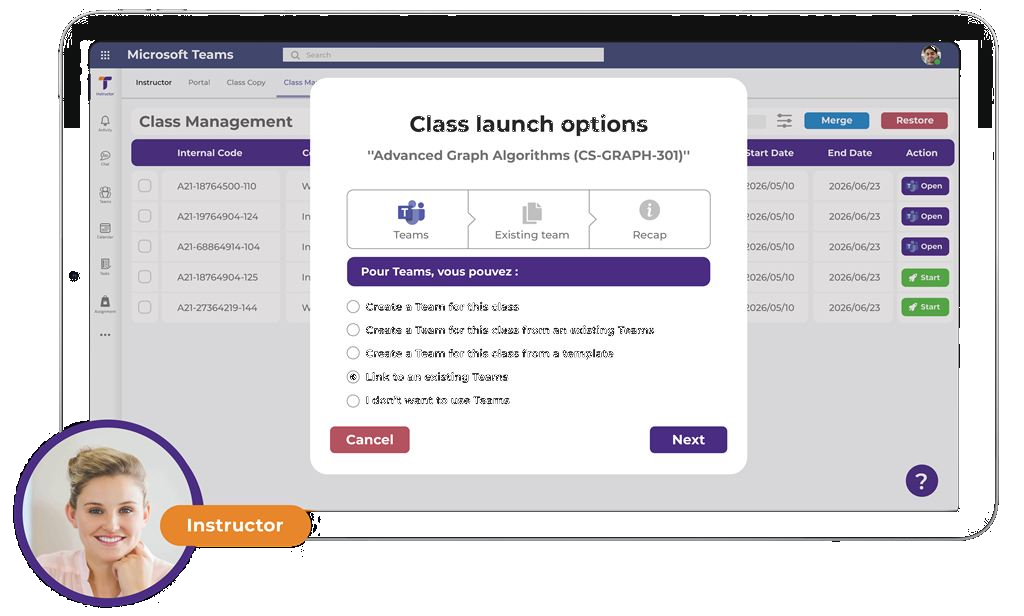
The college or university decides when classes become available for teachers to launch, and when students are added to each class.
Teameo adds a personal app pinned in the left bar of Microsoft Teams. Each audience sees its own version: teachers see the teacher app, students the student app, and staff the employee app, full screen or with tabs. Inside, your institution lists its tools and resources and adds tabs for websites, SharePoint sites and other resources, so everything is in one place, including the class management interface. Students also get a My classes space that lists each of their classes and shows which platform it is given in.
Unlike a standard Teams personal app, it needs no Teams administrator to change: a super-user or an educational technology advisor maintains each audience's space themselves.
Microsoft Teams for Education is a version of Microsoft Teams with features tailored to educational institutions: Class teams with student and teacher roles, Class Notebook integration, assignments, grades, and tighter privacy controls. It is part of Microsoft 365 Education and available with the A1, A3, and A5 Education licenses.
Teams for Education has specific team types (Class, Staff, PLC, Other), built-in Class Notebook, Assignments and Grades apps, and education-specific privacy settings. Standard Teams is designed for workplace collaboration and lacks these pedagogical features.
No. Teameo runs on top of Microsoft Teams for Education. It automates class provisioning from the SIS, handles meta-course fusion, manages the Class Notebook lifecycle, and adds audit logging for Law 25 and GDPR compliance: functions Teams for Education doesn't handle natively at higher-education scale.
Yes, for many use cases. Microsoft Teams for Education includes core LMS functions: Class teams, Class Notebook, Assignments, Grades, student analytics. For institutions already on Microsoft 365, using Teams as the LMS avoids running a separate platform. At higher-ed scale, SIS integration and meta-course fusion need additional tooling like Teameo.
Assignments (post, collect, grade), Grades (per-student gradebook), Class Notebook (content library, collaboration space, per-student sections), Insights (engagement analytics), Reflect (student wellbeing check-ins), and meeting features (lectures, breakout rooms, recordings).
Out of the box, Teams doesn't provision classes from a higher-ed SIS, doesn't handle meta-course fusion for multi-section courses, doesn't archive Class teams and Class Notebooks at term end, and doesn't provide audit logs scoped for Law 25 and GDPR compliance. Teameo adds these as an operational layer on top of Teams for Education.
Yes. Teameo can launch every class automatically from the SIS, or teachers can launch their own. Each teacher has a dashboard of all their classes and decides, per class, how to launch it, whether to merge sections and what to copy from a previous class, then launches it the way they want in one click. Either way, the college or university controls when classes become available for teachers to launch and when students are added.
30-minute demo against your Microsoft 365 tenant and SIS.
Book a Demo